How to calculate utilization rate (and what a good target looks like)
The formula, the choice that changes the answer (available hours), worked examples for a person and a team, and how to set targets by role.
By the LockedHours team · · 4 min read
Utilization tells you how much of the time your people have available is spent on the work you're paid for. It's the single number that connects your timesheets to your profit: if utilization drops by a few points across a team, revenue drops with it, even though everybody looks just as busy.
This guide covers the formula, the one decision that changes the result more than any other, worked examples, and how to use the number without burning people out.
The utilization rate formula
Utilization rate = hours worked on billable work ÷ available hours × 100
Often called billable utilization. Total utilization uses all logged hours (billable and internal) on top instead.
Two versions are in common use, and it's worth knowing which one you're looking at:
- Billable utilization: billable hours divided by available hours. This is the one that tracks revenue.
- Total utilization: all logged hours (client work, internal projects, sales, training) divided by available hours. It tells you whether people are logging their time and whether they have spare capacity at all.
A team can show 95% total utilization and 55% billable utilization at the same time. That gap is the interesting part: it's the internal work, meetings and non-billable client time that never reaches an invoice.
Choosing available hours: the decision that changes the answer
The top of the formula is easy to measure if people log their time. The bottom is a policy choice, and two firms with identical teams can report very different rates depending on it.
| Method | Available hours for a 40-hour week | Effect |
|---|---|---|
| Contracted hours | 40 h every week, 2,080 h a year | Lowest rate; vacation and holidays count as unused capacity |
| Net of time off | Contracted hours minus vacation, public holidays and sick days | Fairer comparison between people and months |
| Net of time off and fixed internal duties | Also subtracts, say, 4 h a week of management for a team lead | Useful for target-setting, but easy to inflate |
There's no single right answer. What matters is that everyone in the firm uses the same definition, so a 75% in one team means the same as a 75% in another.
Worked examples
One person, one week
A designer is contracted for 40 hours. This week they logged 38 hours: 29 on client projects marked billable, 3 on non-billable fixes for a client, 4 on an internal rebrand and 2 in team meetings.
- Billable utilization: 29 ÷ 40 = 72.5%
- Total utilization: 38 ÷ 40 = 95%
- Billable share of logged time: 29 ÷ 38 = 76%
The billable share is a third useful ratio. It doesn't depend on capacity at all, so it's a good check when you're not sure everyone has their weekly hours set correctly.
A team over a month
| Person | Available | Billable | Billable utilization |
|---|---|---|---|
| Account director | 120 h | 54 h | 45% |
| Senior designer | 152 h | 121 h | 80% |
| Developer | 160 h | 131 h | 82% |
| Developer (part-time) | 80 h | 66 h | 83% |
| Team | 512 h | 372 h | 73% |
Notice the team figure: averaging the four percentages would give 72.5%, but the correct team rate weights each person by their capacity. With part-timers on the team, the difference grows.
What's a good utilization rate?
Targets depend on the role far more than on the industry. Industry guides commonly quote something like 70–85% billable utilization for people whose job is delivery, and much less for leadership and client-facing roles who spend time selling and managing. Treat those as a starting point and set your own from your history:
- Pull six to twelve months of billable hours and capacity per person.
- Group people by role (delivery, lead, management) rather than by team.
- Use the median of each group as this year's baseline, and aim to move it a few points, not twenty.
- Check the target against your pricing: if your rates assume 80% and the team runs at 65%, the problem is the price or the plan, not the people.
Common mistakes
- Measuring before people log consistently. Missing timesheets look like low utilization. Fix logging first (see our timesheet best practices).
- Counting non-billable client work as billable. Fixes you don't charge for are real work, but they aren't revenue. Mark them non-billable so the number stays honest.
- Using one target for everyone. A director at 45% may be doing exactly the right job.
- Looking at a single week. Holidays and project gaps make weekly figures jumpy. Compare months or quarters.
- Ignoring rates. Two people at 80% can produce very different revenue. Pair utilization with project profitability.
Tracking utilization in LockedHours
In LockedHours each person has a weekly capacity, and every task is billable or not. The team report shows, for any period, each person's hours, billable hours, billable percentage and utilization against their capacity, and exports to CSV if you want to apply your own definition of available hours.
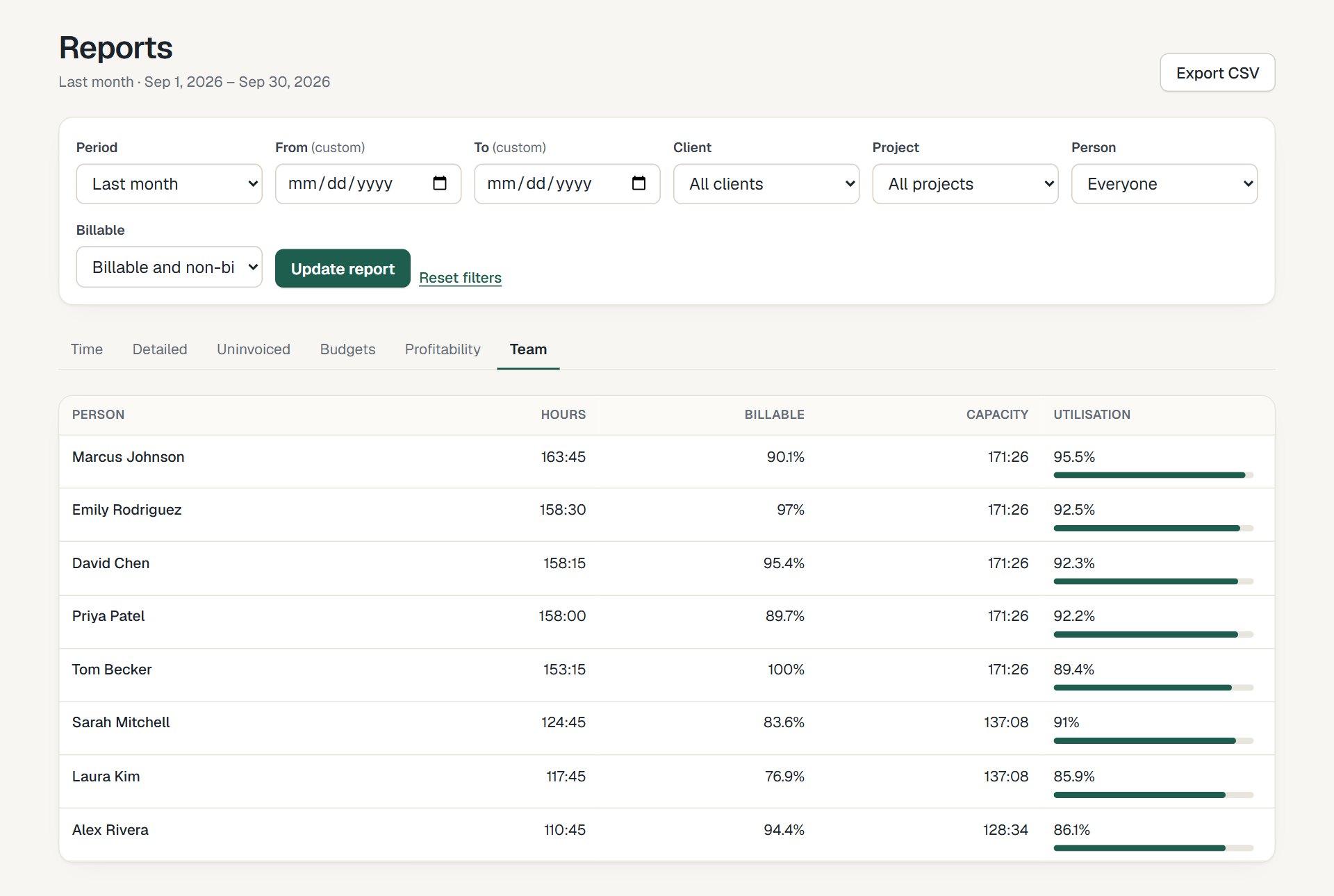
The team report: hours, billable share and utilization per person, for any period.
Because the numbers come straight from time entries, they update as people log time. See reports and team and rates for the details.
Try it with your own numbers
30 days free, no card. $6 per seat, locked in your contract.