Read the Profitability report
Profitability shows, per project, revenue against the cost of the hours and expenses, so you see which projects really make money.
Who can do this: Admins and managersUpdated · 2 min read
Go to Reports and click Profitability. Each row is a project, with Hours, Revenue, Time cost, Expenses, Profit (in red when negative) and Margin.
On a phone each project shows its Margin with a label: Profitable, Low margin (under 20%), Loss or No revenue. Tap the project to see its Revenue, Time cost, Expenses and Profit.
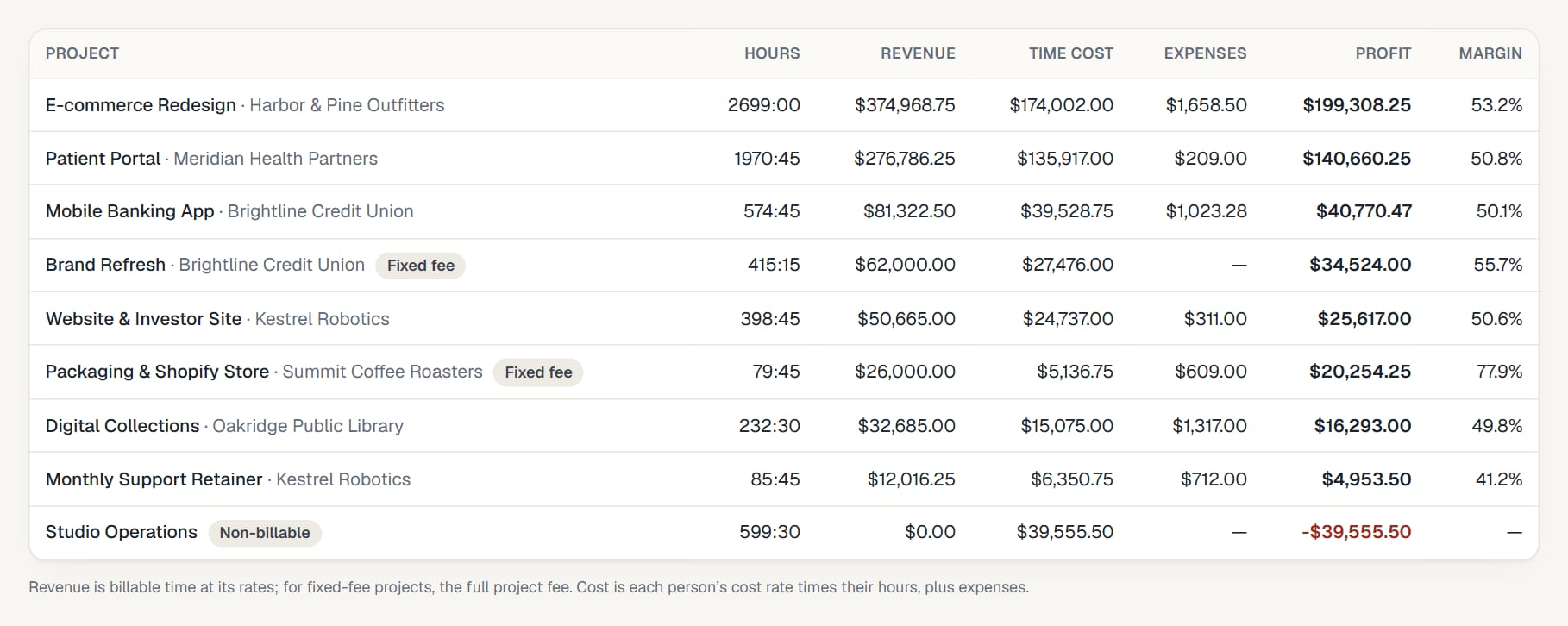 (opens the full-size image)
How it's calculated
| Column | Calculation |
|---|---|
| Revenue | Billable hours × their rates. For Fixed fee projects, the full project fee. |
| Time cost | Each person's hours × the cost rate saved on each entry. |
| Expenses | Expenses on the project in the period. |
| Profit | Revenue − time cost − expenses. |
| Margin | Profit as a percentage of revenue (a dash when there's no revenue). |
If it looks wrong
- Time cost is zero: people have no cost rate. Set them on the Team page: Set hourly and cost rates. Rates apply to new hours only.
- Revenue is zero on billable work: those hours have no rate. See How hourly rates work.
- A fixed-fee project looks hugely profitable in a short period: its whole fee is counted in whatever period you pick. Compare it over All time.
Didn’t find what you needed?
Ask in Help inside the app, or email [email protected]. We aim to reply within 2 business days.