Find work that hasn't been invoiced
The Uninvoiced tab shows billable time and expenses that aren't on any invoice yet, so nothing is forgotten at the end of the month.
Who can do this: Admins and managersUpdated · 2 min read
Step 1: Go to Reports and click the Uninvoiced tab.
Step 2: Choose the Period. To see everything still to bill, choose All time.
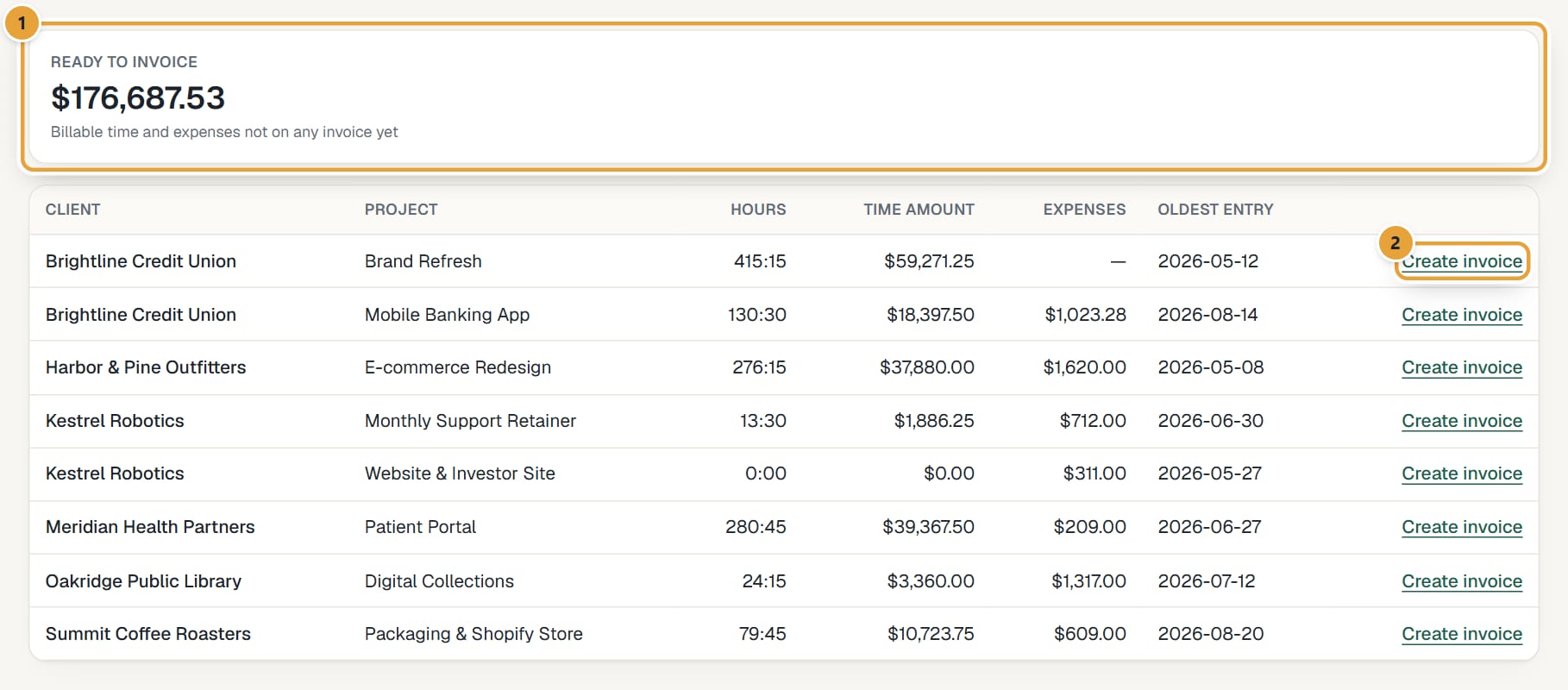
Step 3: Read Ready to invoice at the top (billable time and expenses not on any invoice yet), and the table: Client, Project, Hours, Time amount, Expenses and Oldest entry.
 (opens the full-size image)
Step 4: Click Create invoice on a row (on a phone, tap the row) to open New invoice with that client already chosen, then pick the dates. See Create an invoice from tracked time.
- Hours on a draft invoice count as invoiced and leave this report. Deleting the draft brings them back.
- Billable hours without a rate are not counted in the amounts. See How hourly rates work.
- When everything is billed, the table says Everything billable in this period has been invoiced.
Didn’t find what you needed?
Ask in Help inside the app, or email [email protected]. We aim to reply within 2 business days.