Billable hours: what counts, how to track them and how to bill them
A practical policy for billable and non-billable time, the habits that stop hours leaking away, and how to get from timesheet to invoice cleanly.
By the LockedHours team · · 3 min read
Billable hours are the time you can charge a client for. Simple enough, until someone asks whether the 20-minute call that ran over counts, or whether fixing your own mistake does. Firms that bill by the hour lose most revenue not through low rates but through hours that were worked and never billed.
What counts as billable
The answer lives in your contract, not in your timesheet tool. Most firms settle on something like this:
| Usually billable | Usually not billable | Depends on the agreement |
|---|---|---|
| Work on agreed deliverables | Internal meetings and admin | Travel time |
| Client meetings and calls | Sales and proposals | Project management |
| Research needed for the work | Training and learning | Rework after client changes |
| Revisions within scope | Fixing your own errors | Quick questions by email |
Whatever you decide, write it into the proposal or engagement letter. A client who has read "project management is billed at the standard rate" won't be surprised to see it on the invoice.
Write a one-page time policy
Your team needs to make the billable decision dozens of times a week. A short written policy removes the guesswork:
- Minimum increment. Do you round to 6, 15 or 30 minutes, or bill the exact time? Say whether rounding happens per entry or per day.
- What's billable by default. Set it on the task, not the person. A "Design" task is billable; an "Internal" task isn't.
- What needs a note. Anything that will appear on an invoice should say what was done in words the client understands.
- When time must be logged. Daily is ideal; by the end of the week at the latest.
- Who can change billed time. Once hours are on an invoice they should stop changing.
Tracking billable hours without nagging
Hours leak away when logging is slow or happens long after the work. A few habits fix most of it:
- Track as you go. A timer started at the beginning of a task captures the real duration, including the parts people forget.
- Make the billable choice automatic. If each task already knows whether it's billable and each project knows its rate, nobody has to decide per entry.
- Restart instead of retyping. Most days repeat yesterday's projects. Restarting an entry is faster than creating one.
- Review the week before it closes. A five-minute Friday check of the weekly timesheet catches the gaps while people still remember.
Getting the rate right
Billable hours are only half the invoice. Rates can be set per person (a senior costs more), per task (strategy costs more than production) or per project (a negotiated rate for one client). Decide which level wins when they conflict and apply it consistently.
Keep rate history. When a rate rises in January, December's work should still be billed at the old rate. If your tool overwrites rates, your reports for past periods will quietly change.
From billable hours to invoice
- Run an uninvoiced report for the period: every client with time and expenses not yet billed.
- Check the oldest unbilled entries first. Old hours are the ones most likely to be disputed or forgotten.
- Choose the level of detail the client expects: one line per project, per task, per person, or every entry with its note.
- Create the invoice, send it, and lock the hours so the invoice and your reports always agree.
Our guide on how to invoice clients for hourly work goes through invoice contents and payment terms in more detail.
Billable hours in LockedHours
Every task in LockedHours is billable or non-billable, and each entry picks up the right rate from the project, task or person, with rate history. The uninvoiced report shows what's ready to bill and how old the oldest entry is, and invoices are built from those hours in a few clicks. Hours that are on an invoice are locked.
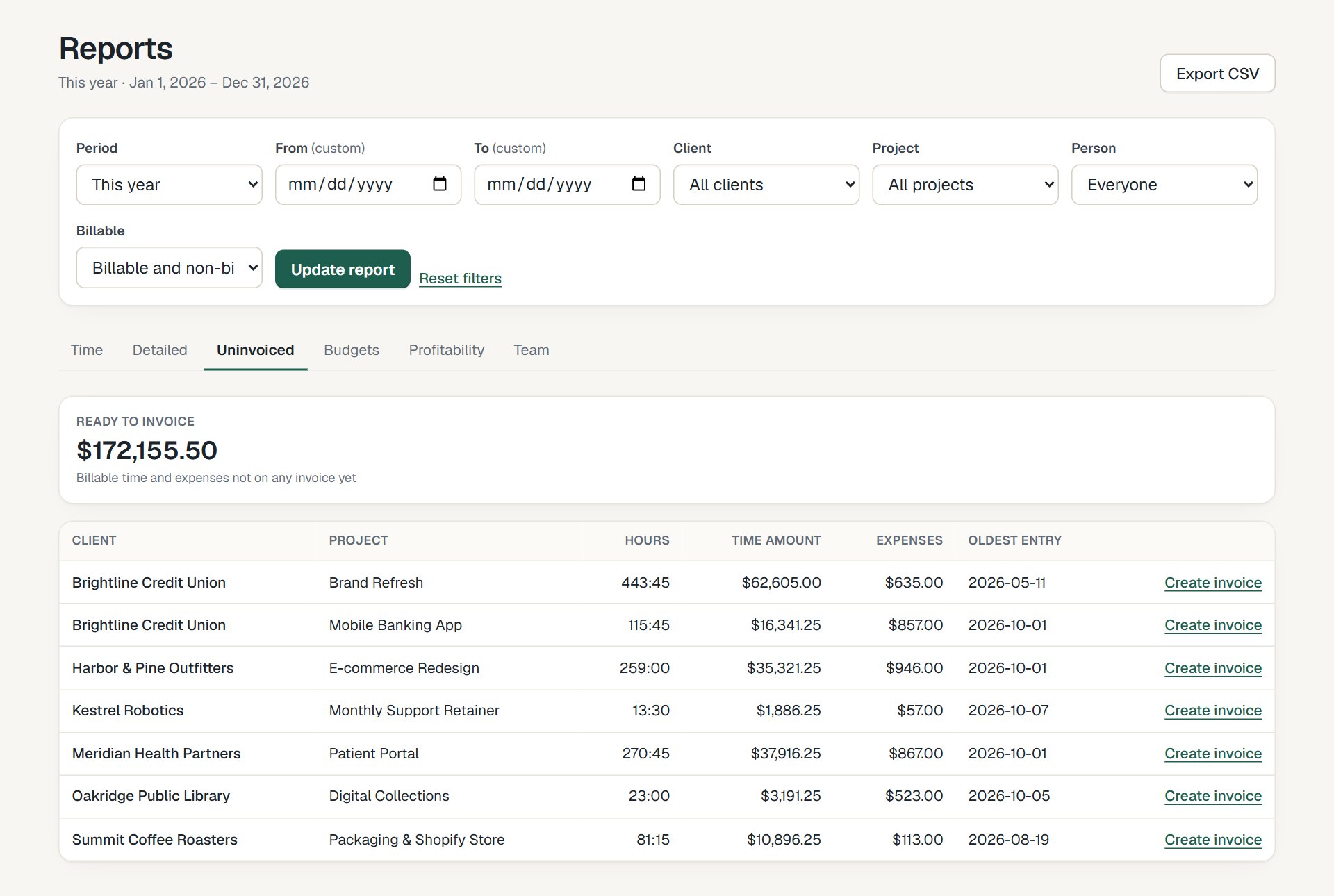
The uninvoiced report: what's ready to bill, per client and project.
See time tracking and invoicing.
Try it with your own numbers
30 days free, no card. $6 per seat, locked in your contract.